# Building a YouTube Transcript Service for AI Workloads
YouTube has a lot of useful knowledge: tutorials, product demos, engineering talks, lectures, interviews, and training videos. But AI applications cannot use that knowledge directly from the video player.
They need transcripts.
More importantly, they need transcripts in a consistent structure:
– Video metadata
– Transcript text
– Timestamped segments
– Optional chunks
– Translation
– Summary
– Batch status
– Error information
This blog explains a reference solution for extracting YouTube transcripts, translating them with OpenAI, and processing multiple videos asynchronously using Kafka.
The goal is to explain a practical architecture that engineers and architects can use as a starting point.
## 1. Problem Statement
Many existing YouTube transcript tools are useful for quick manual work, but they are not enough for AI engineering workflows.
Common problems:
– They return inconsistent transcript formats.
– They are not designed as backend APIs.
– They do not provide clean metadata.
– They do not preserve timestamps in a normalized way.
– They do not support async batch ingestion.
– They are hard to plug into RAG pipelines.
– They do not expose clear provider boundaries.
– They do not handle translation as part of the transcript workflow.
AI systems increasingly need:
– Video-to-text ingestion
– Transcript chunking
– Metadata extraction
– Multilingual translation
– Summary generation
– Batch processing
– Structured JSON output
– Future vector database or knowledge graph integration
This solution addresses those needs by building a local-first transcript service with a clean backend, a modern UI, and provider integrations behind stable boundaries.
## 2. What This Solution Does
The solution accepts one or more YouTube URLs and produces structured transcript output.
For a single video, a user can:
– Paste a YouTube URL.
– Generate the transcript.
– View the video and transcript side by side.
– Click transcript timestamps to jump the video.
– Translate the transcript into another language.
– Generate a summary.
– Inspect the raw normalized JSON.
For batch processing, a user can:
– Submit multiple YouTube URLs.
– Receive a batch ID.
– Let workers process each video asynchronously.
– Track job status.
– Open completed transcript results.
## 3. Target Use Cases
### AI and RAG Ingestion
The structured transcript output can be used as input for a RAG pipeline.
A typical flow could be:
1. Extract transcript.
2. Normalize into timestamped segments.
3. Chunk the transcript.
4. Generate embeddings.
5. Store chunks in a vector database.
6. Use timestamps as citations back to the source video.
### Enterprise Knowledge Search
Companies often have internal video libraries: training content, product sessions, recorded demos, and technical talks.
This service can act as an ingestion layer to convert those videos into searchable text.
### Agentic AI Workflows
AI agents can use transcript tools to retrieve video content, translate it, summarize it, or prepare it for downstream reasoning.
FastMCP provides a useful boundary for this because the transcript and translation capabilities are modeled as tools inside the backend.
### Batch Content Processing
When the input is a playlist, a course, or a channel export, synchronous processing is not enough.
Kafka is used so each video becomes an independent job and can be processed by workers.
## 4. Technology Stack
| Layer | Technology |
| Frontend | NextJS |
| API | FastAPI |
| Tool Boundary | FAST MCP |
| Transcript Provider | SerpAPI YouTube Transcript API |
| Translation Provider | Open AI |
| Summary Provider | Open AI |
| Async Processing | Apache Kafka |
| State Store | PostgreSQL |
| Deployment | Support Local and Kubernetes |
## 5. High-Level Architecture
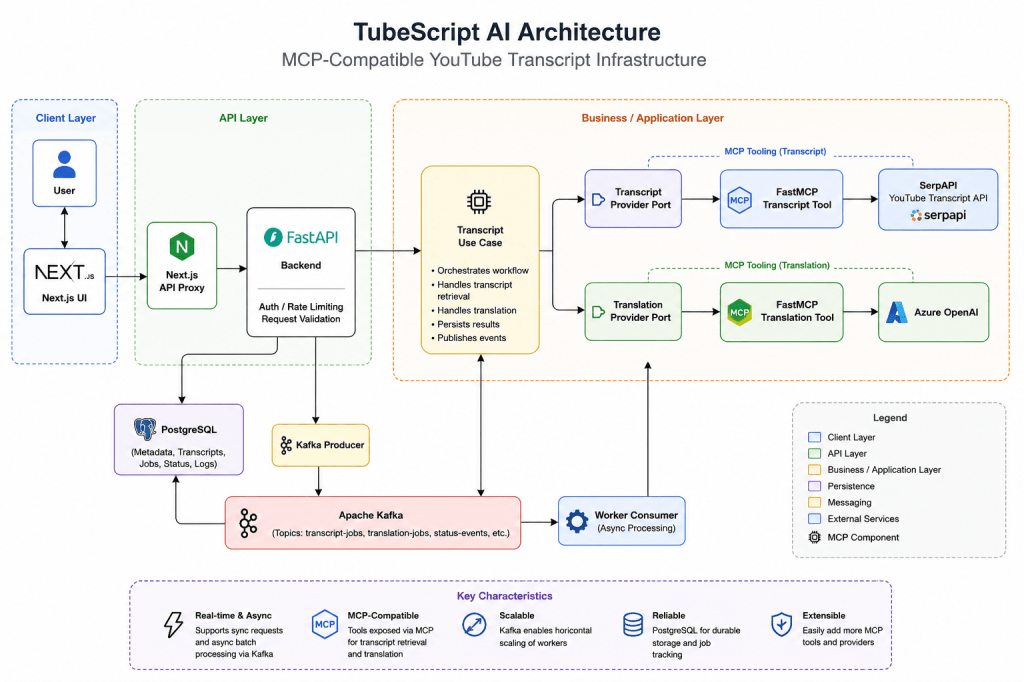
The architecture has three important ideas:
1. **Next.js is only the user interface.**
2. **FastAPI owns the backend workflow.**
It validates requests, runs use cases, talks to providers, and manages batch state.
3. **FastMCP is the integration boundary.**
SerpAPI and Azure OpenAI are connected through backend tools/provider adapters, not directly from UI code.
## 6. How MCP Connects to SerpAPI
The transcript provider is responsible for getting transcript data from YouTube.
In this implementation, the backend uses SerpAPI’s YouTube Transcript API through a provider boundary.
Conceptually, the flow is:
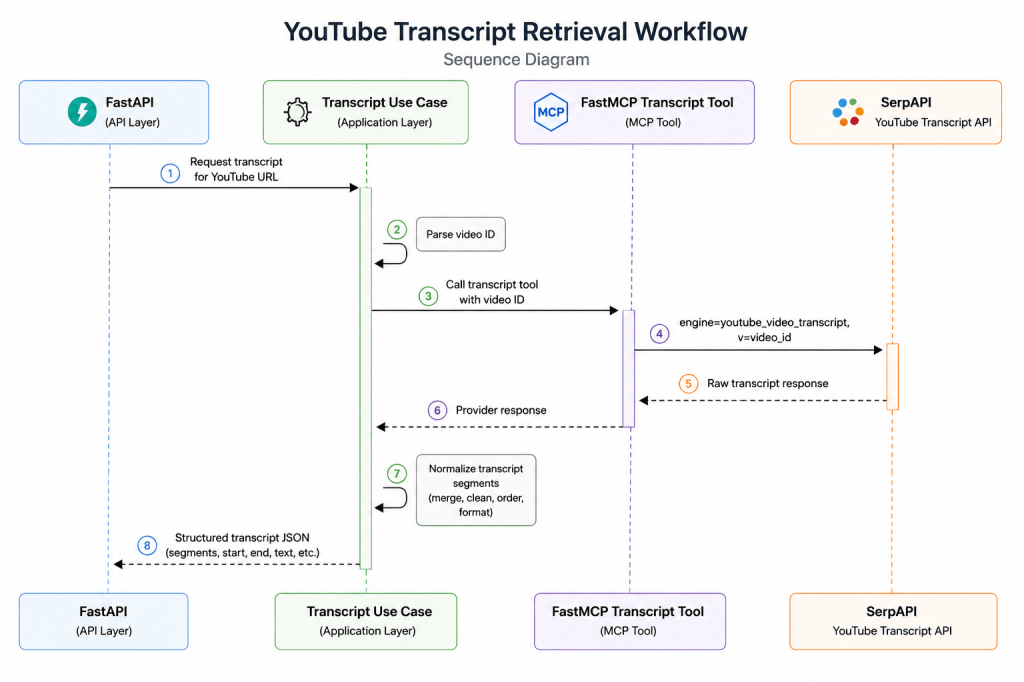
## 7. What This Enables Next
Once transcripts are normalized, many AI workflows become easier:
– Store chunks in a vector database.
– Generate embeddings.
– Build a video search assistant.
– Create timestamp-aware citations.
– Summarize entire playlists.
– Translate training content into regional languages.
– Extract entities, topics, and sentiment.
– Feed transcript tools into AI agents.
The transcript service becomes an ingestion layer for video knowledge.
## 8. Conclusion
This solution shows how to build a practical YouTube transcript service for AI workloads.
The key idea is simple:
> Convert video into structured, timestamped, AI-ready text.
The implementation combines:
– Next.js for the user experience
– FastAPI for backend APIs
– FastMCP for tool boundaries
– SerpAPI for transcript extraction
– Azure OpenAI for translation and summary
– Kafka for async batch processing
– PostgreSQL for durable job state
It is not positioned as a final production platform. It is a reference architecture that engineers and architects can study, run locally, and extend toward RAG, search, analytics, and agentic AI workflows.
To know further, please reach out to my GitHub Repo https://github.com/automationcalling/TubeScript_AI


Leave a Reply